


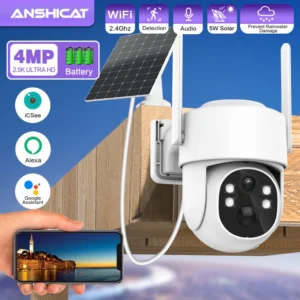

TQ6 Solar Outdoor WiFi Security Camera – 4MP, Night Vision, 360° PTZ, Motion Alerts
$89.99
& Free ShippingAvailability: 10 in stock
Free shipping!
- No-Risk Money Back Guarantee!
- No Hassle Refunds
- Secure Payments
Estimated delivery dates: Mar 23, 2026 - Mar 29, 2026
✅ Product Description
Secure your home with next-level peace of mind. The TQ6 Solar Battery Outdoor WiFi Surveillance Camera from Anshicat offers crystal-clear 4MP Full HD video, intelligent motion-triggered recording, and instant alerts through the iCSee app. Its 360° viewing angle and PTZ rotation ensure complete perimeter coverage, while infrared night vision up to 66 feet keeps your property safe even in total darkness.
Thanks to its solar-powered rechargeable battery and wireless IP connectivity, this camera installs easily with no need for complex wiring. The built-in microphone and speaker allow for two-way audio, making it perfect for communicating with visitors or scaring off intruders.
Compatible with Alexa, and supporting both cloud and local storage, this smart home-ready security solution is your all-in-one defense system for driveways, doorways, gardens, and more.
✅ Specifications
-
Model: TQ6 Solar Battery Outdoor Wifi Surveillance Camera
-
Resolution: 4MP Full HD (2.5K)
-
Viewing Angle: 360°
-
Night Vision Range: 20M (66FT)
-
Lens: 4mm (Focal Length: 3.6mm)
-
PTZ Rotation: 340° horizontal, 90° vertical
-
Motion Detection: PIR, 10m range, 100° detection angle
-
Battery: Built-in 7800mAh rechargeable (up to 180-day standby)
-
Storage: Micro SD up to 128GB (not included), Cloud (subscription required)
-
Audio: Built-in microphone and speaker (two-way audio)
-
App Support: iCSee (Android, iOS, Windows Mobile)
-
Smart Home: Alexa compatible
-
Operating Systems: Windows 7, 8, 10
-
Alarm Actions: FTP Photo, Local Alarm, Push Notification
-
Connectivity: 2.4G WiFi, Wireless IP Network
-
Installation: Side, Ceiling, or Normal wall mount
-
Temperature Range: -20°C to 60°C (4°F to 140°F)
-
Certification: CE, FCC, UL
-
Brand: Anshicat
-
Origin: Mainland China


PTZ Remote Control
PTZ: rotates 340° Horizontally and 90° Vertically.

Solar Powered, 180 Days Ultra-long Standby
Buil-in 7800MA batteries, the solar panel can cyclically save the battery power to the battery camera, which is more energy-efficient, efficient and convenient to save electricity.

AI PIR Motion Detection
Allowing you to monitor what matters without receiving annoying false alerts, get real-time accurate alert notifications in your mobile phone.

Prevent Rainwater Damage for Outdoor Use
The rugged housing and body make IP camera Prevent Rainwater Damage . It works perfectly both inside and outside your house, in any harsh weather conditions.

Infrared night vision + Full color night vision
Infrared night vision mode can provide clear black and white picture even in complete darkness, full color night vision is only automatically awakened in the dark night after APP setting


Clear Two Way Audio
Built-in microphone & speaker, no matter how far away, allow you to interact with pets and family or dissuade unwelcome guests.

Support SD Card & Cloud Storage
Supports TF storage, up to 128GB memory card. First month cloud storage free experience, support online paid purchase in iCsee App, never worry about losing important videos again.

Wifi Connection
You can connect the camera to the router for networking via wifi, only supports 2.4G wifi (5G not supported)

Remote Access and Share Family
Support iOS /Android with the free app iCsee.
You can share it with up to max 20 family members as needed, and multiple person viewing are more reassuring.

Upgrade 4dbi Ubi Dual Antenna
More stable wireless WiFi Connection

NOTICE:
If scanning the QR code fails during connection, please check your network settings and reset the outdoor wireless camera.
Network settings:
1.Only support 2.4GHz WiFi, 5G cannot connect.
2.If your router is dual-band, please disable 5G and set it to 2.4G only.
3.If the wifi password contains special symbols, please delete and change the password.
How to properly connect solar panel and camera?
1.Install the outside cameras security wireless where you want to monitor.
2.Confirm a place where the solar panel can get full sun for most of the day and the distance between solar panel and camera should within 3m(10ft).
3.Secure the 360 security wall mount with the attached 3 screws, then screw the solar panel clockwise to the screw by the hole on the back of solar panel.
How to optimize the efficiency of Solar Panel?
1.Mount your solar panel in well-lit places and avoid locations like the shadow of trees, buildings, or other obstacles to ensure sufficient sunlight.
2.Adjust the orientation of the solar panel time to time to get the maximum sun exposion, since there are different intensities of sun-rays in different weathers, which will affect the energy production.
3.Wipe the surface of the solar panel with wet tissue or cloth regularly to rem

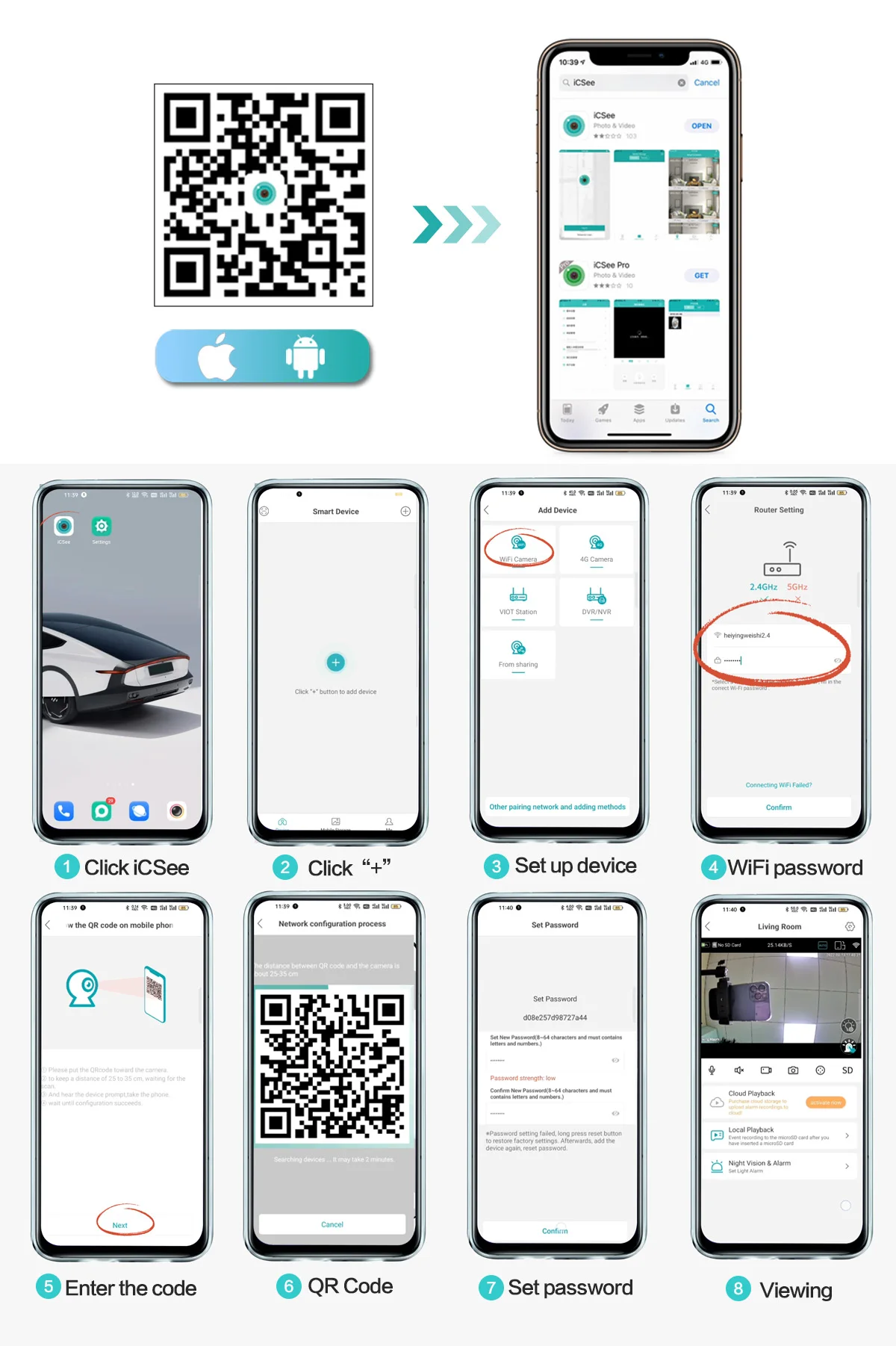
iCSee Connection Method By The APP
Q&A
Q : How should I do if failed to connect the camera and mobile?
A : 1. Please make sure the camera and mobile is in the same router;
2. Please check the router have the DHCP function enabled, and Connected WIFI is 2.4Ghz
3. Please make sure the WIFI signal is strong enough at the camera location, higher than 3 cells is much better;
4. If there is no problem mentioned above, but still not work. Please use the pin to press and hold the Reset button for 15s to reset the camera before connecting the camera. You will hear “Camera Reset ” at a successful reset, and wait 5-8s you will hear “Camera starting up” then try to connect the WIFI again.
Q : Why I can’t get the notifications on my phone?
A : Please turn back to camera setting and check if alarm button on.
Q: Is this a wireless camera, built in battery, no need of power supply?
A: Yes, using 18650 lithium batteries, which can be charged using a solar charging panel camera.
Q: Why this camera not supported my Home Assistant or NAS system?
A: This camera only supports iCSee、NVR‘s ONVIF protocol, other third party not for sure; please contact us for further confirmation.
Related products
-
Estimated delivery dates: Apr 1, 2026 - Apr 11, 2026
-
Estimated delivery dates: Mar 23, 2026 - Mar 29, 2026
-
Estimated delivery dates: Mar 23, 2026 - Mar 29, 2026
KBDFA HD Camera Drone with 1080p Video Recording – Lightweight Quadcopter with APP Control & 12-Minute Flight Time
Price range: $86.99 through $99.99 -
Estimated delivery dates: Mar 23, 2026 - Mar 29, 2026

Reviews
There are no reviews yet.